Reports, release and the draft export
ScoutSheet ranks the players in each division by their ScoutSheet Score, from 0 to 100, built from every evaluator's scores across every session. League Admins see every report from the tryout's Reports page. Evaluators see their own report and, once an Admin releases a division, that division's combined rankings. For the draft, Admins download the draft export CSV.
Who can do what
| Report | Who can see it |
|---|---|
| Reports index, overall ranking, draft export, bias flags | League Admins |
| Division aggregate | League Admins; evaluators on the tryout once it is released |
| Individual evaluator report (with notes) | That evaluator and the league's Admins |
| Coaching pair report (with both sets of notes) | The two pair members and the league's Admins |
| Score corrections | League Admins |
How is the ScoutSheet Score worked out?
For each criterion with a weight, ScoutSheet averages the player's scores (weighting each session by its weight) and turns it into a fraction of the best possible: a rating or choice is its average over the scale's maximum (flipped first when lower is better), and a measurement counts by where it falls between the criterion's minimum and maximum. The score is the weighted average of those fractions, times 100.
Measurements are placed on the scale set in the scoring form, never on the range of times that happened to be entered, so one mistyped time can't flatten everyone else. Players with equal scores (to two decimals) share a rank, and the next rank is skipped (1, 2, 2, 4).
Weights stay editable after scoring, and reports recompute the next time they load.
The reports
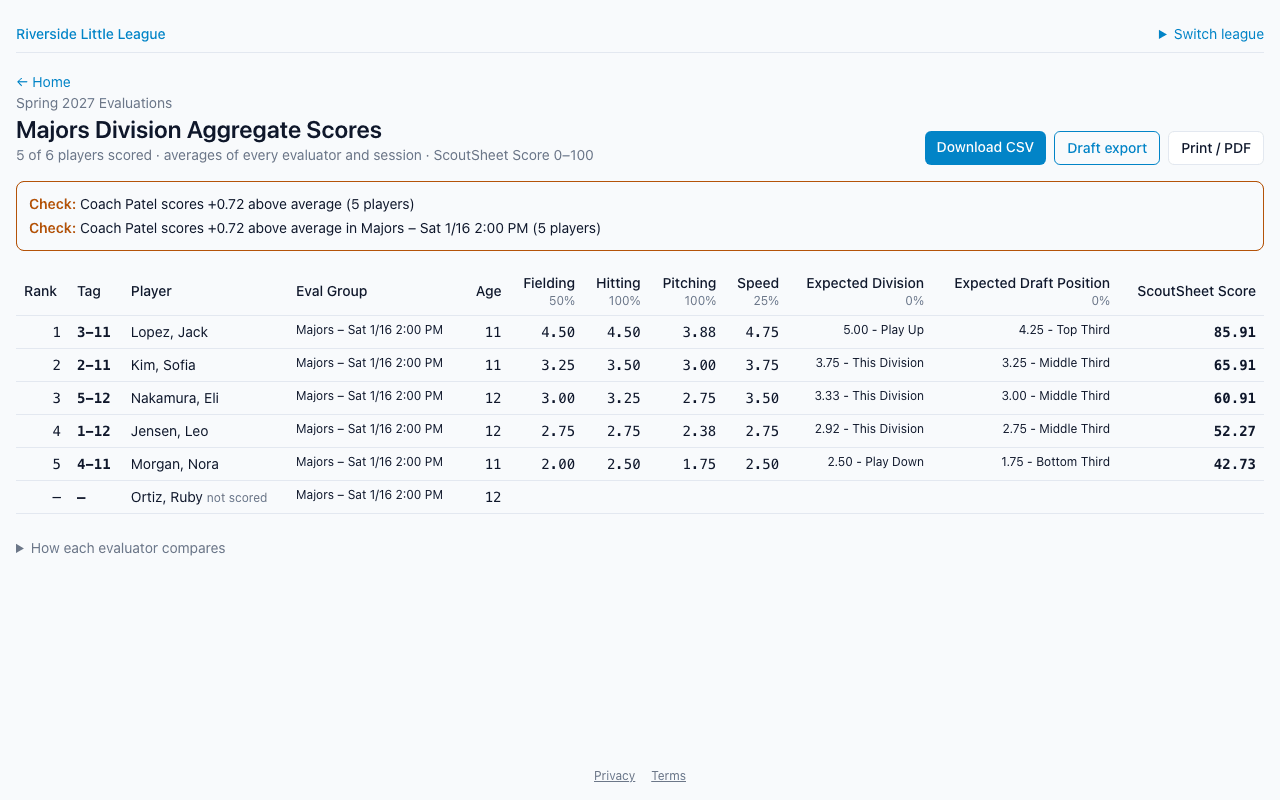
- Division aggregate: every scored player in the division, with rank, tag, Eval Group, league age, each criterion and the ScoutSheet Score. Ranks compare players across all of the division's Eval Groups; the Eval Group filter narrows the list without changing ranks. Unscored players are listed last as "not scored".
- Bias flags (Admins only): how each evaluator's ratings compare with the average of all evaluators on the same players. An evaluator who is 0.5 points or more above or below average across three or more shared players is flagged, for the whole division and per Eval Group. Only ratings and choices count.
- Individual evaluator report: one evaluator's own rankings and private notes.
- Coaching pair report: a manager's and assistant coach's scores averaged, with both sets of notes, each marked with its author. Pairs are set up on the tryout's Evaluators page or the Reports page.
- Overall ranking (Admins only): every scored player across all divisions, with their division and division rank.
Evaluators' notes never appear in the division aggregate, the overall ranking or the draft export.
How do I release a division to evaluators?
On the Reports page, press Release to evaluators next to the division and confirm. Every evaluator on the tryout can then open that division's aggregate from their home page, without the bias flags. Unrelease takes it back. Both are recorded in the league's audit log.
If you later change a weight in a way that would re-rank a released division, ScoutSheet asks first. Saving takes the release back, so you can check the new rankings and release again.
CSV downloads
Each report has Download CSV, and the division aggregate's columns keep the TeamGenius export layout, starting with "Row Number" and "Player Pool" (the Eval Group). Spreadsheet formulas in cells are neutralised.
The draft export
Draft export (Admins only, released or not) is the division CSV followed by Player ID, Attended, Player Tag, each criterion for each session, and Overall Rank. It lists every registered player in the division, with no-shows marked as not attended. Every download is recorded in the league's audit log.
Correcting a score
On an evaluator's report, Admins can open Correct scores, find the player and change or Void a score. The correction is logged with your name and reaches the evaluator's phone on its next sync, and their later edits can't change it back. Corrections never touch notes. They work on open and closed tryouts, but not once the season is closed.
Not built yet
Send reports (emailing reports to evaluators) is shown on the Reports page but is not built yet. Share reports by releasing a division, or by downloading and sending the CSV yourself.